How restaurants opt in to text alerts
Restaurants on Plenty Plates always get order alerts by email. Text alerts are optional, off by default, and only a restaurant's owner can turn them on. This page shows exactly how, and the messages that follow.
Program: Plenty Plates order alerts
Plenty Plates is operated by Croftware LLC, a California company (“Plenty Plates”, “we”, “us”)
Help: support@plentyplates.com
Where opt-in happens
Text alerts are turned on in the Text alerts card of the Plenty Plates restaurant console, which only the restaurant's signed-in owner can change. There are three steps, and no text alert is sent until all three are done.
- Enter a US mobile number in the mobile number field.
- Tick the consent checkbox. It is unticked by default, and alerts cannot be turned on without ticking it. Its wording, in full, is quoted below.
- Press “Send code” and enter the 6-digit code texted to that number. This confirms the number belongs to the person who entered it, before any order alert is sent to it.
The consent checkbox, word for word
“Text order alerts to this number. Plenty Plates will text new orders, reminders to respond, and the day-before list. Message frequency varies with your orders. Message and data rates may apply. Reply STOP to stop, HELP for help.”
Shown beside the unticked checkbox in the Text alerts card
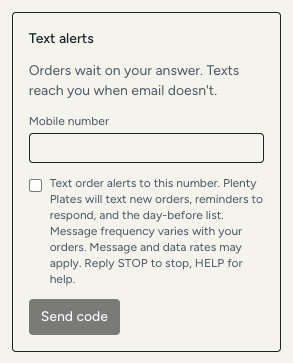
When the owner confirms the code, we record the number, the time of consent and the wording agreed to, as described in the privacy policy.
Sample messages
These are the messages the program sends. Order numbers, times and amounts change with each order.
- Confirmation codePlenty Plates code: 482913. It expires in 10 minutes.
- New orderPlenty Plates: new order OC-000123 for Fri Oct 16, 12:00 PM, 25 guests, $480.00 to you. Answer by 10:05 AM: plentyplates.com/o/OC-000123
- Reminder to respondPlenty Plates: OC-000123 is waiting for your answer. Answer by 10:05 AM or it's declined automatically: plentyplates.com/o/OC-000123
- Day-before reminderPlenty Plates: tomorrow, Fri Oct 16, 12:00 PM, OC-000123, pickup, 25 guests. Details: plentyplates.com/o/OC-000123
Reply to HELP
- HELPPlenty Plates order alerts. Help: support@plentyplates.com. Reply STOP to stop.
Stopping text alerts
Text alerts can be turned off at any time in the Text alerts card of the restaurant console, or by replying STOP to any message. Reply HELP for help. Order alerts keep arriving by email either way. Message frequency varies with your orders. Message and data rates may apply. Carriers are not liable for delayed or undelivered messages.
More
The full program terms are in Section 9 of the Terms of Use. How we handle the mobile number and consent is in the privacy policy. Questions: support@plentyplates.com.